"Pillar is an open source copilot that turns user and agent requests into completed actions, right inside your app."
TL;DR: Pillar is an embedded AI copilot that executes tasks inside your product for users and agents.
Users or agents can type what they want. The copilot carries it out client-side in the browser, using the user’s existing session, permissions, and security checks. You install the SDK via npm and register your existing frontend code as tools.
Example: in a banking app, a user types “send $200 to my cleaners.” Pillar finds the right recipient, navigates to the transfer flow, and pre-fills the form. The user still reviews and confirms. If your app requires 2FA for that acion, so does the copilot.
They built Pillar to solve their own problem. At their last company (Double Finance), they saw a pattern: users asked for outcomes they already supported, but still opened support tickets. They wanted a way to reuse the frontend code they had already shipped, without rebuilding flows or adding new “automation” surfaces.
Pillar is what they wish they had.
The Problem
Teams ship faster than ever. But when your changelog is 10x longer than it used to be, users can’t keep up.
Discoverability breaks down: the UI changes, features move, and people forget where things live.
Friction turns into “support”: users open tickets that aren’t really support tickets. The user wanted to do something your product already supported but couldn’t get there.
Most products don’t have an “action layer”: AI agents are starting to use web apps the same way users do: navigate, click, fill forms. Products need to prepare for this
Bottom line: products need a reliable, permissioned way to execute actions end-to-end - not just document them.
How Pillar Works
Pillar turns a user request into action by combining planning with in-browser execution.
Plan: Pillar determines which steps/tools to run
Execute: your app runs those tools in the browser (navigation, API calls, state updates, form fills)
Confirm: the user stays in control for sensitive actions.
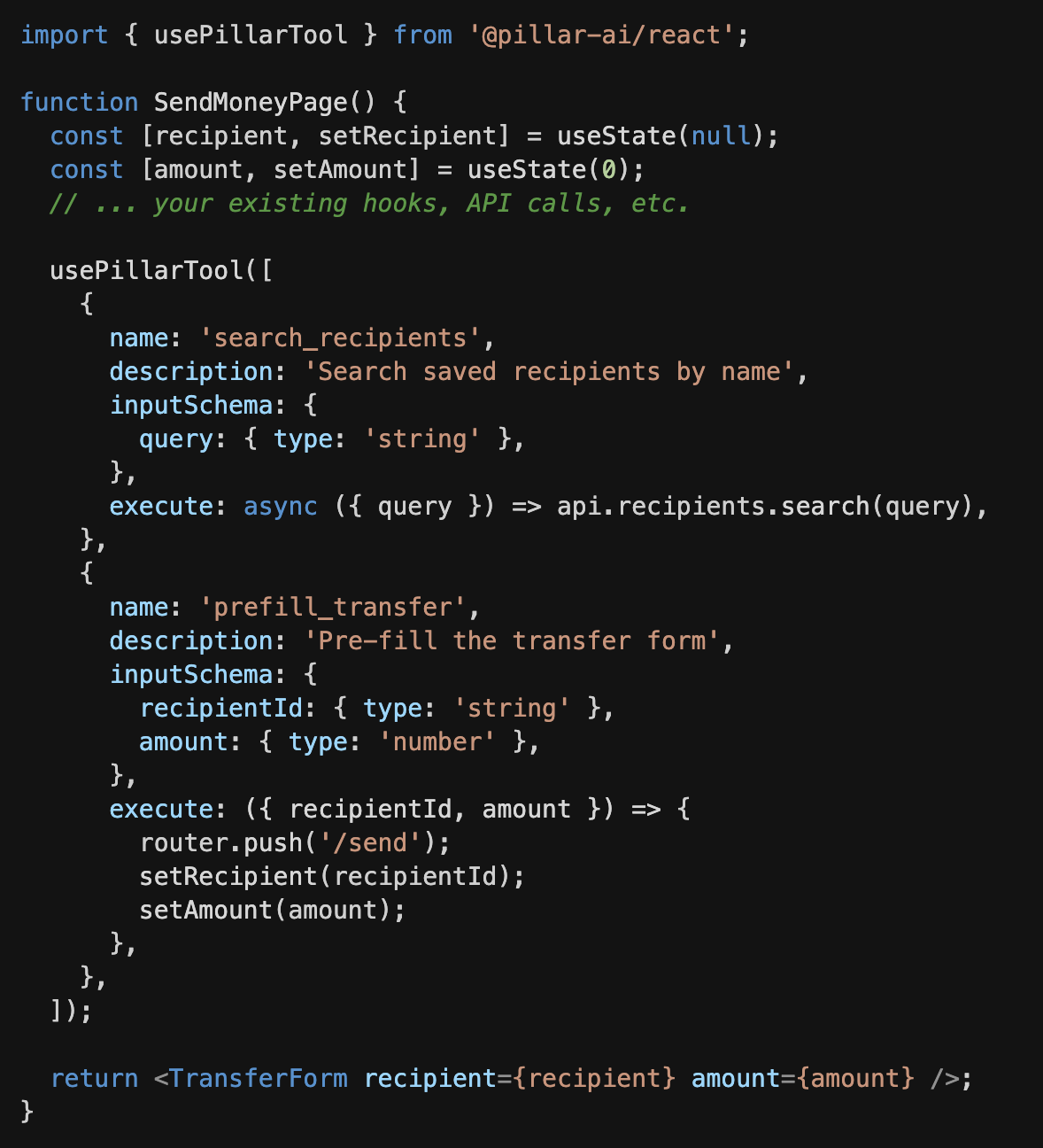
You register tools inside your existing React components:
What happens at runtime when a user types “send $200 to my cleaners”:
Pillar calls search_recipients with “cleaners”
Selects the right match
Calls prefill_transfer with the recipient + amount
User reviews and confirms in the existing flow
Because execution happens in the browser, tools run with the current user’s permissions and session. Pillar can’t do anything the user can’t do.
Pillar syncs with your help content (Zendesk, Intercom, Notion, Confluence, internal docs) so requests map to the right tools/flows. When it picks the wrong path, you flag it and the correction is captured so the same issue is less likely to repeat.
SDKs are available for React and vanilla JavaScript. Registered tools can also be reused by other copilots/agents via WebMCP (navigator.modelContext).
Their Ask
If you lead product/engineering and users open tickets for things your product already does, they would love to talk!
If you know someone who fits that (founders, VP Product, Head of Support), intros are appreciated
Lorem ipsum dolor sit amet, consectetur adipiscing elit. Suspendisse varius enim in eros elementum tristique. Duis cursus, mi quis viverra ornare, eros dolor interdum nulla, ut commodo diam libero vitae erat. Aenean faucibus nibh et justo cursus id rutrum lorem imperdiet. Nunc ut sem vitae risus tristique posuere.
.png)